
Is ChatGPT Safe to Use? 7 Things You Should Never Share with AI
ChatGPT is safe for most everyday tasks — but it is not a private tool. Everything you type can be used to train future models, read by OpenAI staff, or retained in logs. Seven categories of information should never go into any public AI: passwords, personal ID numbers, confidential work documents, medical details, financial data, children's information, and other people's private data. Use a local AI (like Ollama) for anything sensitive.
21 July 2026
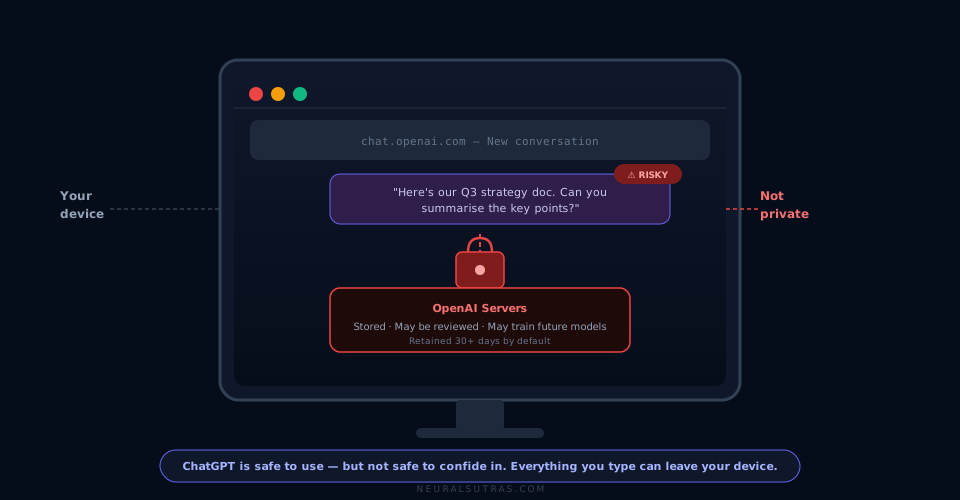
TL;DR: ChatGPT is safe for most everyday tasks — but it is not a private tool. Everything you type can be used to train future models, read by OpenAI staff, or retained in logs. Seven categories of information should never go into any public AI: passwords, personal ID numbers, confidential work documents, medical details, financial data, children's information, and other people's private data. Use a local AI (like Ollama) for anything sensitive.
Most people who use ChatGPT regularly have never thought about where their words go.
You open the app. You type. You get an answer. You close the tab.
But that conversation didn't disappear. And what you typed matters more than most people realise.
ChatGPT is one of the most useful tools built in decades. It is also not private. Treating it like a private notepad or a personal assistant who keeps secrets is a mistake that can have real consequences — from leaked work documents to identity theft to GDPR violations.
This guide is not about scaring you away from AI. It's about using it confidently, with a clear understanding of what it's doing with your information.
Is ChatGPT Safe to Use?
Yes — for most things.
ChatGPT is safe for explaining concepts, drafting emails, brainstorming ideas, summarising articles, getting feedback on writing, writing code, or researching general topics.
It is not safe as a container for sensitive information.
The distinction matters: it's safe to use, but not safe to confide in.
What Actually Happens When You Type Into ChatGPT
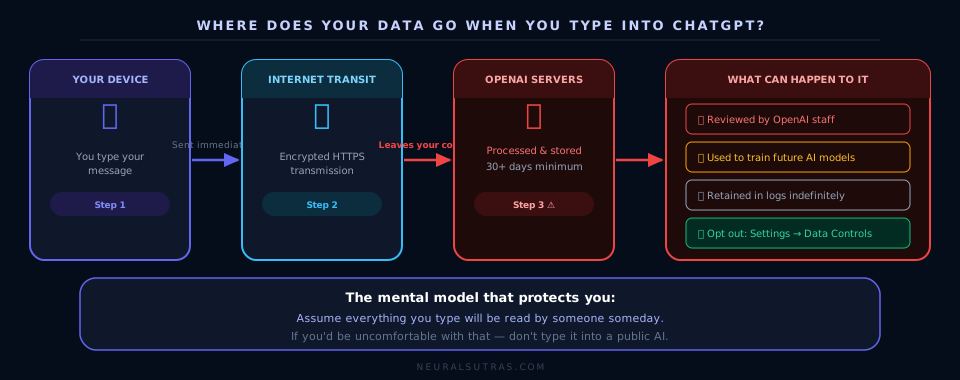
Before covering what not to share, it helps to understand where your data actually goes.
When you type into ChatGPT:
- Your message is sent to OpenAI's servers — it leaves your device immediately
- It may be reviewed by OpenAI staff — OpenAI's terms state that human reviewers can access conversations to improve the system
- It may be used to train future models — by default, your conversations can be used as training data (you can opt out in settings, but this is off by default)
- It is stored in OpenAI's systems — conversations are retained for 30 days minimum, sometimes longer
This is not unique to ChatGPT. It applies to Claude, Gemini, Copilot, and virtually every public AI tool.
The practical implication: assume everything you type will be read by someone someday. That's the right mental model for any public AI tool.
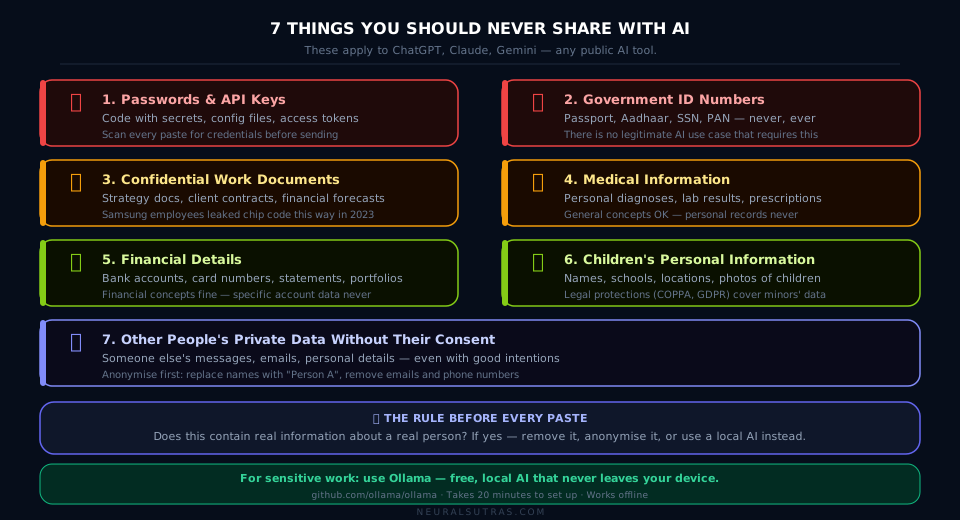
The 7 Things You Should Never Share with AI
1. Passwords, API Keys, and Security Credentials
This sounds obvious, but it happens constantly.
People paste a piece of code and forget it contains an API key. They ask for help with a login issue and include the password in the context. They share a config file with a database connection string.
Why it matters: Your credentials can end up in training data or logs. If OpenAI is ever breached, that information could be exposed. Even without a breach, it's a practice that normalises unsafe security habits.
The rule: Before pasting anything technical — code, config files, error logs — scan it for secrets. Remove anything that looks like a key, token, password, or connection string.
2. Government ID Numbers (Passport, Aadhaar, Social Security, PAN)
Your national ID numbers are the skeleton key of identity theft. A bad actor with your ID number, name, and date of birth can open bank accounts, apply for loans, or file fraudulent tax returns in your name.
Why it matters: There is almost never a legitimate reason to paste your ID number into an AI tool. If you think there is — there isn't.
The rule: Never type national ID numbers, passport numbers, or tax IDs into any public AI, under any circumstances.
3. Confidential Work Documents
This is where most professional data breaches related to AI actually happen — not through hacking, but through well-intentioned employees.
Employees paste internal strategy documents to get a summary. They upload a client contract to ask for a clause explanation. They copy a financial forecast into ChatGPT to clean up the formatting.
Each of those actions sends that document to a third-party server outside your company's control.
Why it matters: Most employment contracts include confidentiality clauses that cover internal documents. Many industries — healthcare, legal, finance — have regulatory requirements (GDPR, HIPAA, attorney-client privilege) that make sharing client data with a public AI a serious legal risk.
The real-world example: In 2023, Samsung engineers leaked proprietary semiconductor code by pasting it into ChatGPT. Samsung subsequently banned ChatGPT internally. (BBC News)
The rule: If a document is marked confidential, internal, or client-facing — don't paste it into a public AI. Use a local AI (see below) for this kind of work.
4. Medical Information (Yours or Anyone Else's)
Your health information is among the most sensitive data you own. It affects your insurance, your employment, and your most private moments.
People ask ChatGPT about their symptoms, their test results, their medication interactions. This is fine at a surface level — but the moment you include your name, your NHS number, your specific diagnosis, or a photo of a prescription — you've moved into territory that should stay private.
Why it matters: Medical AI queries can reveal patterns about your health over time. In many jurisdictions, health data has specific legal protections that public AI tools are not designed to comply with.
The rule: Use AI to understand medical concepts in general — "what does elevated cortisol mean?" is fine. Never paste a personal medical report, lab result, or prescription into a public AI tool.
5. Financial Details
Bank account numbers, credit card details, loan account numbers, investment portfolio data — these should never appear in a public AI conversation.
This is distinct from asking AI about financial concepts, which is perfectly fine. "Explain how compound interest works" is harmless. "Here's my bank statement, help me categorise my spending" is not.
Why it matters: Financial data is the second most common target of identity theft after ID numbers. Even partial account details — the last four digits of your card combined with your name and address — can be enough for social engineering attacks.
The rule: Ask AI about financial concepts freely. Never share specific account details, statements, or portfolio breakdowns.
6. Children's Personal Information
This one has legal teeth in many countries.
Under GDPR (Europe), COPPA (United States), and similar laws elsewhere, children's personal data — names, ages, school names, photos, location details — has specific protections that most public AI tools are not built to honour.
Why it matters: Beyond the legal risk, children's data is particularly sensitive because it can affect them for decades. A pattern of information shared about a child today could theoretically be used against them as an adult.
The rule: Never include identifiable information about children in AI conversations — not their full name, school, location, or photos.
7. Other People's Private Information Without Their Consent
This is the easiest one to overlook.
You might be using AI to draft a message to a colleague, summarise feedback from a client, or analyse a conversation you had. Without thinking, you paste the other person's words, name, email, or personal details into ChatGPT.
You didn't ask their permission. They didn't consent to their information being sent to OpenAI's servers.
Why it matters: This is a GDPR violation if you're in Europe — and a breach of trust everywhere. Most people would not be comfortable knowing their private messages or personal details had been pasted into an AI system.
The rule: Anonymise before pasting. Replace names with "Person A" and "Person B." Remove emails, phone numbers, and any other identifying details before using AI to help with communications involving other people.
What To Do If You Need AI for Sensitive Work
You don't have to choose between AI productivity and data privacy. The answer is local AI.
Ollama is a free, open-source tool that runs AI models directly on your computer. Your data never leaves your device — no servers, no training data, no logs.
Setup takes about 20 minutes. You get the same kind of AI assistance as ChatGPT, but for anything confidential.
Full guide: [coming soon] — How to Run AI Locally on Your Laptop (Ollama Guide)
A Quick Reference Card
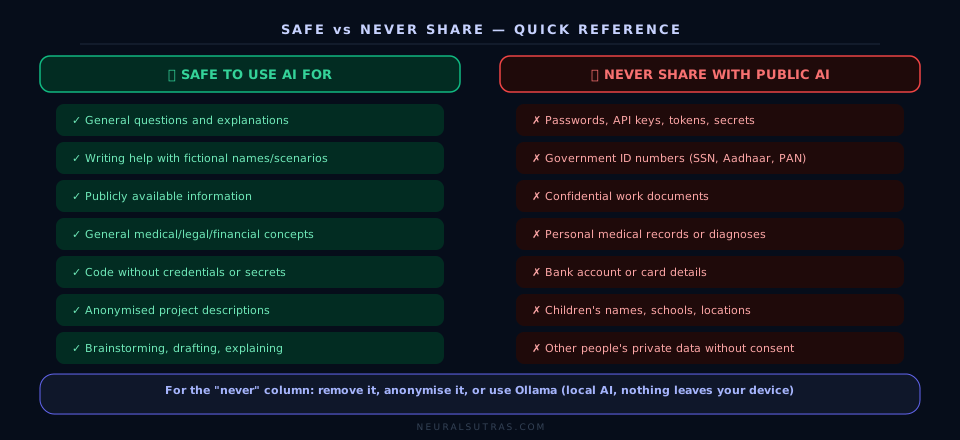
| Safe to share ✅ | Never share ❌ |
|---|---|
| General questions | Passwords or API keys |
| Fictional names and scenarios | Government ID numbers |
| Publicly available information | Confidential work documents |
| General medical concepts | Personal medical records |
| Financial concepts and formulas | Bank account or card details |
| Non-identifying project descriptions | Other people's private data |
| Code without secrets | Code with credentials embedded |
Practical Checklist
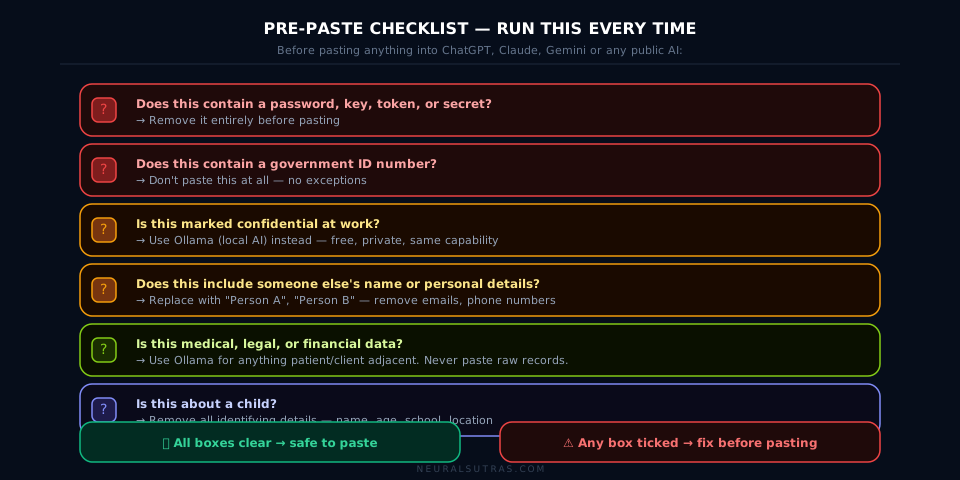
Before pasting anything into a public AI tool:
- Does this contain a password, key, or token? → Remove it
- Does this contain a government ID number? → Don't paste it at all
- Is this marked confidential at work? → Use Ollama instead
- Does this include someone else's name or personal details? → Anonymise first
- Is this medical, legal, or financial data? → Use Ollama for anything sensitive
- Is this about a child? → Remove all identifying details
If any box is checked, either remove the sensitive information or switch to a local AI.
Key Takeaways
- ChatGPT is safe for general use — not safe as a private tool
- Everything you type can be stored, reviewed, and used for training by default
- Seven categories should never go in: passwords, ID numbers, confidential work docs, medical data, financial details, children's information, and other people's private data without consent
- Opt out of data training in ChatGPT settings: Settings → Data Controls → Improve the model for everyone → Off
- The Samsung incident shows this isn't theoretical — professional data has already leaked via AI
- For sensitive work, use Ollama — free, local, private, same capability
- When in doubt: anonymise, generalise, or don't paste it at all
The Bottom Line
ChatGPT is genuinely one of the most useful tools available right now. The goal isn't to avoid it — it's to use it intelligently.
Most conversations with AI are completely harmless. Asking ChatGPT to explain a concept, draft an email to a fictional recipient, help debug code with no secrets in it, or summarise a public article — all of that is fine.
The line to draw is simple: does this contain real information about a real person? If yes, that information should only go into an AI tool if you'd be comfortable with it appearing in a data breach, a training dataset, or a security audit.
Most of what you work on in AI doesn't come close to that line. The seven categories above are where people get into real trouble — usually not because of malice, but because they didn't know the line existed.
Now you do.
Frequently Asked Questions
Can I opt out of my conversations being used for training? Yes. In ChatGPT: Settings → Data Controls → "Improve the model for everyone" → Off. This stops your conversations from being used to train future models. Note: your conversations may still be retained in logs for safety purposes.
Is Claude or Gemini safer than ChatGPT? All three have similar data policies for their free tiers — conversations can be reviewed by staff and used for improvement. Claude (Anthropic) and Gemini (Google) have Enterprise tiers that offer stronger data isolation. For sensitive work, use a local AI regardless of which public tool you prefer.
Is ChatGPT GDPR compliant? OpenAI has taken steps toward GDPR compliance (they can be fined up to €20 million or 4% of global turnover for violations). However, using a public AI tool with personal data of EU residents remains a legal grey area for businesses. When in doubt, consult your legal team and use local AI for anything involving personal data.
What is Ollama and is it difficult to set up? Ollama is a free, open-source tool that lets you run AI models locally on your computer. Setup takes about 20 minutes and doesn't require technical knowledge. A full guide is coming soon on NeuralSutras.
My company uses Microsoft Copilot — is that safer? Microsoft 365 Copilot (enterprise plan) offers stronger data isolation than consumer AI tools — data typically stays within your Microsoft tenant and isn't used for training. If your company has an M365 enterprise subscription, Copilot is generally safer for work documents than consumer ChatGPT. Confirm with your IT department.
Further Reading
- OpenAI Data Controls FAQ — exactly how your data is used and how to opt out of training
- OpenAI: How your data is used to improve model performance — official breakdown of data retention and training
- Why Does ChatGPT Make Stuff Up? — NeuralSutras
- OpenAI Privacy Policy — official data usage terms
- Ollama GitHub — local AI setup
- GDPR and AI Tools — ICO guidance — UK Information Commissioner's Office
What's Next
If this guide helped you, these are worth reading next:
- Best AI Tool for Your Job: A Practical Guide by Role — which AI is right for your specific profession, including guidance on data-sensitive roles like accountants and HR managers
- How to Run AI Locally on Your Laptop (Ollama Guide) (coming soon) — a full walkthrough for setting up private, local AI on Windows or Mac
Enjoyed this guide? Subscribe to the NeuralSutras newsletter for one practical AI guide every Sunday — and follow our YouTube channel for step-by-step tutorials.
NeuralSutras — Practical AI for Everyone Have a question or correction? We want to know: neuralsutras@gmail.com
NeuralSutras
Practical AI education for students, professionals, and business owners. Every guide is tested, honest about limitations, and written to stay useful long-term.
One practical AI lesson, every week
No hype. No news roundups. Just one actionable guide on using AI to work smarter — every Sunday.
Subscribe free →